
syslog and Splunk : Logrotate

Syslog (rsyslog or syslog-ng) is used by almost 99% of Linux based Splunk installations for collection of data especially from network devices where the data is transient. Key things to remember while collecting these logs are
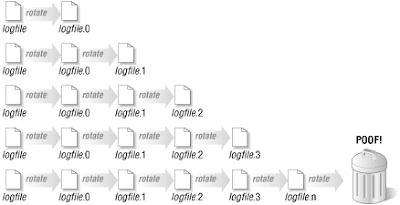
  • To store the log using syslog and forward to other systems if required.
  • Store them in a well formatted directory structure.
  • Direct streaming to Splunk is not preferred as restart of Splunk causes problem

This leads to storing  the data and hence managing the data (store for 1 day and delete etc.). We use "logrotate" extensively for this purpose
Link to git code:  logrotate.d
Loading ....
  • Delaycompress is required, so that log files are NOT rotated while splunk is reading it
  • While collecting into splunk discard any .gz extensions
  • Ensure size is specified to a feasible value

Comments

Post a Comment

Popular posts from this blog

Splunk : Transform data further from already transformed data

In many circumstances, you may need to extract or transform a data which has just been extracted by another transform. Please see a below case whereby the _raw needs to have a new sourcetype (index time), then on such modified sourcetype you need to extract the fields , and one of the extracted fields itself is an XML. We can achieve all this using props.conf and transforms.conf within an app (or local/ directory of your existing app) In props.conf  # =================================================================  # These are executed in the same order that they appear in the list so ORDER CAREFULLY!  [incoming_sourcetype]  TRANSFORMS-sourcetype = rename_mySourcetype  [mySourcetype]  # Search Time extractions by REPORT  REPORT-mySourcetype = my_deep_extraction_1, my_deeper_extraction_2, my_deeper_extraction_3  # =================================================================  In transforms.conf  # ====================...

Naming Standards for Splunk Objects

Every software architect or developer would know the importance of "naming conventions". But this may not be the case with the business users, admins or Project Managers. Hence as a Splunk Administrator my first job is to define the naming conventions of Splunk Objects Splunk Objects What do you mean by Splunk objects? Splunk object refers to any configuration item(s) that are under the control of your team. For example, a dashboard you created, a custom splunk app, a report etc. For the splunk objects you may not have direct control, the naming conventions may not apply. So the conventions can be applied only to the objects that are created by you/your team and which you have FULL control. Ensure you are well familiar with Splunk configuration file precedence   to understand the object precedence as the naming convention should be built upon it. Naming Conventions and Methodology Ensure if your organisation have a naming convention methodology? Use camelCase (not underscores...

Welcome Note

I have been thinking to create a blog for quite some time with my experiences with Splunk. The aim of this blog is to share my experience with Splunk and other big data tools. This blog is NOT intended for beginners, but would urge them to use " answers.splunk.com " or " docs.splunk.com " to read and understand basics. I would love to invite others to share their experience and post to this blog. Please feel free to "comment" so I could provide you edit access to this blog. Key Points to Note: This site has NOTHING to do with Splunk Inc and hence opinion expressed here are purely personal Code snippets should be hosted in github preferably as "gist" Images can be self hosted or uploaded to this blog Ensure that you don't copy any of your company's or client's details in this blog.